
Fundamentals of Stage Lighting
Stage lighting is the art and technology of shaping visual perception on a theatrical stage. Mastery of its vocabulary is essential for anyone studying the Certificate Programme in Theatre Lighting Techniques in the United Kingdom. The foll…
Stage lighting is the art and technology of shaping visual perception on a theatrical stage. Mastery of its vocabulary is essential for anyone studying the Certificate Programme in Theatre Lighting Techniques in the United Kingdom. The following glossary presents the most frequently encountered terms, each explained in depth, with practical examples and typical challenges that students may face when applying them in real‑world productions.
Luminaire – The generic term for any lighting fixture that produces illumination. Luminaries range from simple PAR cans to sophisticated moving‑head LEDs. In practice, the choice of luminaire determines the quality of light, the ease of control, and the logistical requirements of rigging. A common challenge is matching the luminaire’s output to the venue’s power capacity while maintaining the desired aesthetic.
Ellipsoidal reflector – A type of optic that focuses light into a tight beam, often used in a profile spotlight. The reflector’s shape concentrates the lamp’s output, allowing precise shaping with shutters and gobos. For example, an ellipsoidal reflector can be used to highlight a lead actor’s face while keeping the surrounding area dark. A frequent difficulty is achieving even focus across the entire beam, which requires careful adjustment of the lamp’s position relative to the reflector.
Profile spotlight – Also known as an ERS (Ellipsoidal Reflector Spotlight), this fixture combines an ellipsoidal reflector with interchangeable lenses, shutters, and gobos. It is the workhorse for creating sharp, defined beams and for executing “hard edge” lighting designs. In a practical application, a designer may use a profile spotlight to project a silhouette of a tree onto a backdrop. One challenge is managing the heat generated by the lamp, which can affect both the fixture’s internal components and the surrounding set pieces.
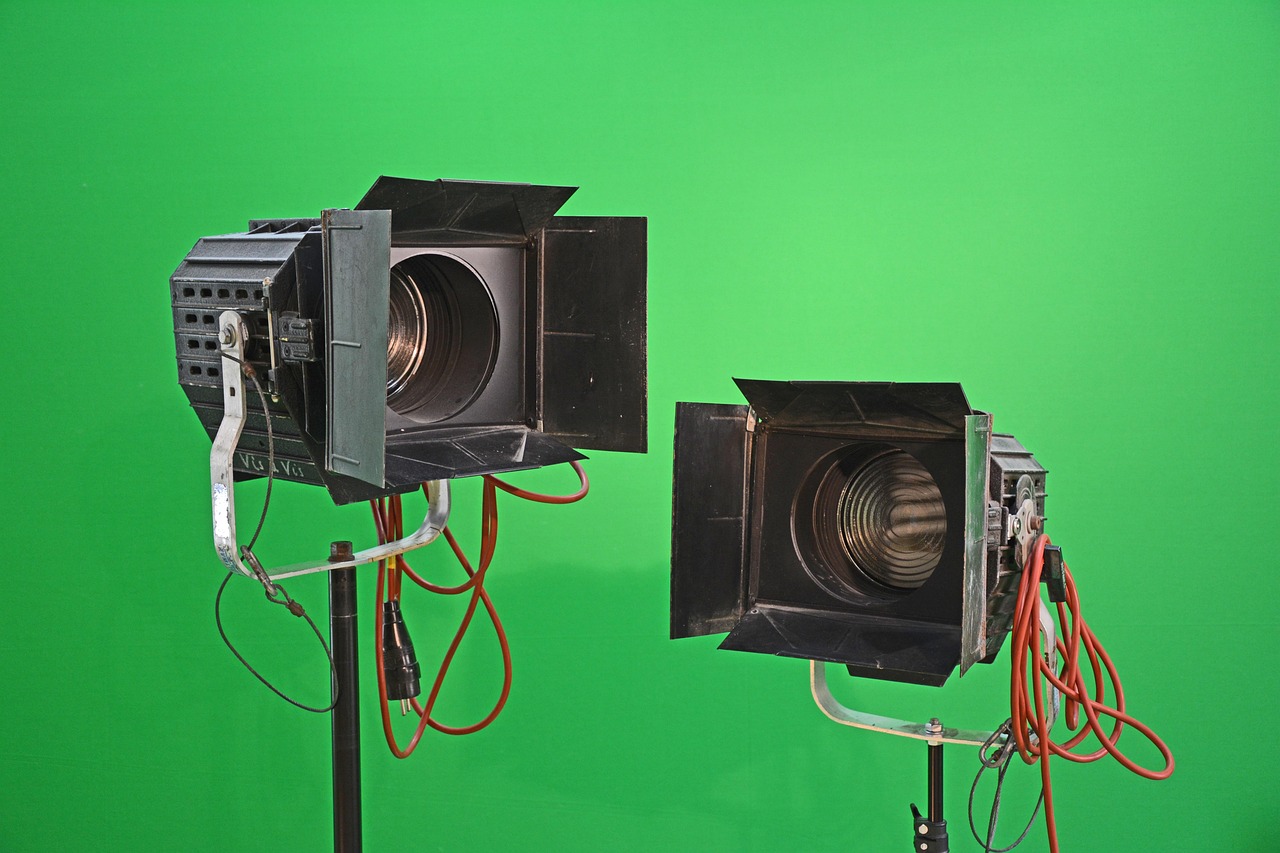
Fresnel – A fixture that uses a Fresnel lens to produce a soft, diffused beam with a controllable edge. The name derives from the French physicist Augustin‑Jean Fresnel, who invented the lens design. Fresnels are ideal for creating a “wash” of light that can be feathered to blend smoothly into surrounding illumination. For instance, a low‑intensity Fresnel can provide ambient front light that gently wraps the actors. A common issue is the “hot spot” that can appear if the lamp is not properly centered in the fixture, leading to uneven illumination.
PAR can – Short for Parabolic Aluminized Reflector, this fixture emits a relatively hard-edged beam, making it suitable for strong washes or “rock concert” effects. PAR cans are often fitted with colored gels to create vibrant hues. In a musical theatre production, a series of PAR cans may be used to flood the stage with blue light during a night‑time scene. The main challenge with PAR cans is their limited ability to shape the beam, which can result in unwanted spill onto the audience or backstage areas.
Gobo – A metal or glass stencil placed in a luminaire to project patterns, textures, or images. Gobos are commonly used in profile spotlights and some LED fixtures. A designer might select a leaf‑shaped gobo to simulate a forest canopy for a scene set outdoors. The practical difficulty lies in aligning the gobo correctly and ensuring that the projected image remains sharp across the distance; misalignment can cause distortion or loss of focus.
Color gel – Thin sheets of transparent, heat‑resistant material that filter the light to produce a specific hue. Historically, gels were made of acetate; modern versions often use polycarbonate or polyester. In rehearsal, a lighting technician may stack a blue gel over a warm amber gel to achieve a custom teal shade. A typical challenge is the degradation of gels over time due to heat exposure, which can shift the color and require regular replacement.
LED module – The light‑emitting component of an LED fixture, composed of one or more diodes that generate illumination. LEDs are praised for their energy efficiency, low heat output, and ability to mix colors digitally. In a contemporary production, an LED wash unit can be programmed to transition smoothly from sunrise orange to midday yellow without changing any physical gels. However, LEDs can present challenges such as “color spill” where the spectrally wide output may affect camera sensors differently than traditional lamps.
DMX protocol – The standard digital communication system (Digital Multiplex) used to control lighting fixtures and consoles. DMX transmits up to 512 channels of data per universe, each channel representing a parameter such as intensity, color, or movement. For example, a lighting designer may assign channel 001 to control the intensity of a front‑of‑house spotlight, while channel 002 controls its pan movement. Common challenges include addressing errors, where two fixtures inadvertently share the same DMX address, leading to conflicting commands.
Dimmer – An electrical device that reduces the voltage supplied to a lamp, thereby controlling its intensity. Traditional dimmers operate on a “phase‑control” principle, while modern LED‑compatible dimmers may use “PWM” (Pulse Width Modulation). In practice, a dimmer rack is patched to the lighting console, allowing the designer to fade a light from full to zero over a specified time. A frequent issue is “crosstalk” where a dimmer’s load interferes with adjacent channels, causing unwanted fluctuations.
Lighting console – The central control surface used to program, cue, and execute lighting designs. Consoles can be analog, digital, or PC‑based, each offering varying levels of flexibility. An example of console usage is programming a “cue” that simultaneously fades the house lights down while bringing up a spotlight on the protagonist. Technical challenges arise when integrating legacy fixtures with modern consoles, often requiring extensive patching and firmware updates.
Cue – A predefined lighting change that is triggered at a specific point in the performance, typically by the stage manager. Cues can involve adjustments to intensity, color, position, or a combination of parameters. For instance, Cue 23 may dim the background wash while increasing the intensity of a side light to emphasize a dramatic revelation. One challenge for students is learning to balance cue timing with musical tempo, ensuring that lighting transitions feel seamless.
Fade – The gradual change in intensity of a light over a set period. Fades are a fundamental tool for creating mood and pacing. A classic use is a “slow fade” from bright daylight to a dim evening, helping the audience perceive the passage of time. The main difficulty is achieving a smooth fade without “popping” or noticeable steps, which can be mitigated by using high‑resolution dimmers and precise console programming.
Crossfade – The simultaneous fading of one light out while another fades in, often used to transition between scenes without a blackout. In a musical, a crossfade might blend a warm amber wash into a cool blue wash to signal a change in location. The challenge lies in coordinating the timing of both fades so that the overall illumination remains balanced throughout the transition.
Channel – A single line of control within a DMX universe, representing one parameter of a fixture (e.G., Intensity, colour, pan). A fixture with multiple functions may occupy several channels. For example, a moving‑head LED may use channel 001 for intensity, 002 for pan, 003 for tilt, and 004 for colour. The learner must manage channel allocation carefully to avoid “overlap” where two fixtures unintentionally share the same channel address.
Address – The unique DMX start number assigned to a fixture, determining where its channels begin within the data stream. Proper addressing ensures that each fixture responds correctly to console commands. In rehearsal, a technician may set the address of a profile spotlight to 201, meaning its intensity channel occupies 201, its pan channel 202, etc. A typical problem is “address drift” caused by accidental changes in the fixture’s settings, necessitating regular verification.
Patch – The process of mapping fixtures to specific channels on the lighting console. Patching can be manual or automated, depending on the console’s capabilities. For instance, a patch may assign the first four channels of a dimmer rack to the first four LED strips. The challenge is maintaining an accurate patch record, especially in productions with large numbers of fixtures, as any inconsistency can lead to misfiring during a show.
Instrument – Another term for a lighting fixture, especially when referring to its role within a design (e.G., “Front instrument”). An instrument can be a static light such as a Fresnel or a dynamic device like a moving‑head. In a backstage context, the term emphasizes the functional aspect rather than the physical hardware. A common difficulty is coordinating multiple instruments to achieve a cohesive visual effect without excessive overlap.
Hanging point – The location on the rig where a luminaire is suspended, typically a batten, pipe, or truss. The hanging point determines the fixture’s angle, height, and reach. For example, a front light may be hung on a low batten to achieve a flattering downward angle on the actors’ faces. The main challenge is ensuring that the hanging point can support the fixture’s weight, requiring knowledge of load limits and proper rigging techniques.
Batten – A long metal pipe, usually mounted above the audience, used to hang lighting instruments, scenery, and rigging. Batten positions are identified by numeric codes (e.G., “Batten 1”) and are a key reference point in cue sheets. A typical application is hanging a series of PAR cans on the front of Batten 2 to create a uniform wash. The challenge for students is calculating the cumulative weight on a batten and verifying that it stays within safety limits.
Truss – A structural framework composed of aluminum tubes and fittings, used to support lighting and scenery at varying heights and angles. Trusses can be straight, curved, or custom‑shaped. In a touring production, trusses are often assembled on‑site to create a flexible lighting rig. The main safety concern is ensuring that truss connections are secure and that the overall structure is properly anchored to prevent collapse.
Safety cable – A secondary cable that secures a luminaire in case its primary hanging point fails. Safety cables are usually attached at a lower point on the fixture to limit the distance it can fall. In practice, a safety cable might be rigged from a profile spotlight to a nearby support bar. The challenge is to route safety cables discreetly while maintaining the required safety factor, as per UK health and safety legislation.
Gobo wheel – A rotating disc in a moving‑head fixture that holds multiple gobos, allowing rapid changes of pattern during a performance. The gobo wheel can be programmed to select specific patterns at precise moments. For example, a production may use a gobo wheel to switch from a city skyline to a rain‑droplet pattern within a single cue. A common difficulty is ensuring that the wheel’s alignment remains consistent after each change, as misalignment can cause the projected image to shift.
Zoom – The ability of a fixture to change the size of its beam by adjusting the focal length of its lens. Zoom is expressed in degrees (e.G., 10°–30°) And allows a single instrument to serve multiple functions. A zoom lens can narrow a wash into a tight spot for a solo scene, then widen again for a full‑stage ensemble. The challenge is that zoom changes can affect focus, requiring re‑focusing each time the beam size is altered.
Beam – A concentrated column of light, often with a defined edge, used to draw attention or create dramatic effects. Beam fixtures typically use a narrow lens and may include a prism or kaleidoscope for visual texture. In a concert, a beam may sweep across the audience to create a dynamic visual experience. The main technical issue is managing “beam spill” that can distract the audience or interfere with other lighting elements.
Wash – A broad, even field of light used to illuminate large areas of the stage. Washes are usually generated by fixtures with a wide beam angle, such as Fresnels or LED panels. A wash can be colored to set the overall mood of a scene (e.G., A green wash for a forest). Achieving a uniform wash without hot spots or gradients is a frequent challenge, often requiring careful positioning and the use of diffusion.
Front light – Light that originates from in front of the performers, typically at a 45‑degree angle, providing even illumination of the face and body. Front light is essential for ensuring that actors are clearly visible to the audience. In a drama, a subtle front light may be combined with a stronger side light to add depth. The primary difficulty is avoiding “flat” lighting that eliminates three‑dimensional shape; this is mitigated by adding side and back lighting.
Side light – Light that comes from the side of the stage, creating shadows that emphasize the contours of the body and add sculptural depth. Side lighting can be used to suggest tension or highlight a character’s emotional state. For example, a harsh side light may be employed during a confrontation scene to accentuate facial lines. The challenge is balancing side light intensity with front light to avoid overly dramatic shadows that distract from the performance.
Back light – Light positioned behind the performers, often used to create a rim or halo effect that separates the subject from the background. Back lighting can add a sense of glamour or highlight movement. In a dance number, a strong back light may outline the dancers, enhancing their silhouettes. One common issue is “spill” where the back light unintentionally illuminates the background, reducing the intended contrast.
Top light – Light that shines from directly above the stage, typically used to simulate natural overhead illumination such as sunlight or moonlight. Top lights can be static or moving, depending on the design. In a daytime outdoor scene, a top light may be combined with a soft fill to emulate the sun’s high position. The challenge is avoiding harsh shadows directly beneath performers, which can be mitigated by adding fill lights.
Practical – A lighting source that appears onstage as part of the set, such as a table lamp, chandelier, or streetlight. Practicals are used to enhance realism and can be controlled either manually or via the lighting console. An example is a desk lamp that the actor turns on during a monologue, providing a narrative cue. The difficulty lies in integrating the practical’s intensity with the overall design, ensuring it does not overpower or under‑illuminate the surrounding area.
Followspot – A manually operated, high‑intensity spotlight that tracks a performer’s movement across the stage. Followspots are often equipped with variable focus, iris, and color gels. In a musical, the lead singer may be highlighted by a followspot throughout a song. The primary challenge is coordinating the operator’s movements with the performer’s timing, requiring rehearsed cues and clear communication.
Beam angle – The angle, measured in degrees, that defines the spread of a light’s output from the fixture. Narrow beam angles produce tight spots, while wide angles generate washes. For example, a 10° beam angle is suitable for a spotlight, whereas a 30° angle works well for a wash. Determining the appropriate beam angle for each fixture is a key design decision; using an incorrect angle can result in either insufficient coverage or excessive spill.
Intensity – The perceived brightness of a light source, often measured in lux or foot‑candles at a specific distance. Intensity is controlled via dimmers or the fixture’s built‑in controls. In a dramatic scene, a designer may lower the intensity of all lights to create an intimate atmosphere. A common challenge is maintaining consistent intensity across different types of fixtures, especially when mixing incandescent and LED sources.
Colour temperature – A numerical value (in Kelvin) that describes the hue of a light source, ranging from warm (around 2700K) to cool (over 6000K). Colour temperature influences the mood and realism of a scene; warm light can suggest sunrise or indoor warmth, while cool light evokes daylight or clinical settings. The challenge for students is balancing colour temperature with colour gels, as improper stacking can shift the hue away from the intended effect.
Colour mixing – The process of combining multiple colours to achieve a desired hue, either through physical gels or digital LED control. Additive colour mixing (used in LEDs) involves blending red, green, and blue light to create a spectrum of colours. Subtractive mixing (used with gels) filters the light to remove wavelengths. For example, an LED fixture may mix 40% red, 30% green, and 20% blue to produce a soft amber. The difficulty is that additive mixing can produce colours that appear different on camera versus to the naked eye, requiring careful calibration.
Gobo rotation – The ability of a fixture to spin a gobo, creating dynamic patterns such as swirling stars or moving textures. Gobo rotation can be programmed to synchronize with music or choreography. In a fantasy production, a rotating gobo may simulate magical sparkles falling across the stage. A technical issue is the added noise from the motor, which can be audible in quiet scenes; silent‑operation gobos are sometimes required.
Shutter – Mechanical blades within a profile spotlight that shape the beam by cutting away portions of the light. Shutters can be set to create geometric shapes (e.G., Squares, triangles) or to block unwanted spill. A designer might use shutters to prevent light from hitting a backdrop while still illuminating a performer. The challenge is achieving precise alignment; misaligned shutters can cause uneven edges or unintended shadow lines.
Lens – The optical element that focuses or diffuses light, influencing beam quality and focus distance. Different lenses (e.G., Plano‑convex, aspheric) are selected based on the desired effect. For instance, a narrow‑focus lens may be installed in a profile spotlight to achieve a crisp edge. A common problem is lens fogging due to heat, which can degrade image quality and require regular cleaning.
Diffusion – Material placed in front of a light source to soften its output, reducing harsh shadows and creating a more even illumination. Diffusion can be achieved with fabrics, gels, or built‑in diffuser panels. In a rehearsal, a lighting technician may attach a diffusion gel to a Fresnel to achieve a gentle fill. Over‑diffusing, however, can cause loss of intensity and colour saturation, so finding the right balance is essential.
Rigging – The collective process of installing, suspending, and securing lighting fixtures and related equipment. Rigging involves understanding load calculations, safety standards, and the use of hardware such as clamps, chains, and rigging points. A typical rigging task might involve hanging a series of moving‑head fixtures on a high truss to cover the entire stage width. The greatest challenge is ensuring compliance with UK health and safety regulations, which mandate regular inspections and proper documentation.
Load chart – A reference document that lists the weight of each lighting fixture, allowing designers to calculate the total load on a batten or truss. Load charts are essential for safe rigging and for planning the distribution of fixtures. For example, a designer may use a load chart to determine that Batten 3 can support three 15‑kg fixtures without exceeding its rated capacity. Misreading a load chart can lead to over‑loading, creating a safety hazard.
Spot – Short for “spotlight,” a highly focused beam used to isolate a specific area or performer. Spotlights often have adjustable focus and may include accessories such as barn doors. In a play, a spot may be used to highlight a character’s monologue, drawing the audience’s attention. The challenge is maintaining the spot’s focus as the performer moves, which may require manual tracking or automated moving‑head technology.
Barn door – Adjustable metal flaps attached to the front of a fixture that restrict the spread of the beam, allowing precise control over the illuminated area. Barn doors are commonly used on Fresnels and profile spotlights. A practical application is using barn doors to shape a wash so that it does not spill onto the audience. The difficulty is that barn doors can cast sharp shadows if not positioned correctly, requiring careful adjustment.
Color wheel – A rotating disc that holds multiple color gels or LED filters, enabling rapid changes of hue during a performance. Color wheels are often motorized and can be programmed from the console. In a dynamic dance piece, a color wheel may shift from red to purple to match the music’s tempo. A challenge is synchronizing the wheel’s rotation speed with cue timing to avoid mis‑alignment of colour changes.
DMX channel – The individual data pathway within a DMX universe that carries a single value (0‑255) representing a controllable parameter. Each fixture may occupy multiple DMX channels depending on its capabilities. For example, a moving‑head may use channel 001 for intensity, 002 for pan, 003 for tilt, and 004 for colour. Managing DMX channels efficiently is vital; an overloaded universe can lead to latency or loss of control.
Universe – A set of up to 512 DMX channels transmitted together, often referred to as a “DMX universe.” Larger productions may use multiple universes to accommodate many fixtures. In a theatre with 1200 channels of lighting, three universes would be required. The main challenge is ensuring proper synchronization between universes, as mismatched timing can cause cues to appear out of order.
Patch sheet – A written or digital record that maps each fixture to its corresponding DMX channel(s) and physical location. Patch sheets are essential for troubleshooting and for re‑programming the console. A typical patch sheet entry might read: “Profile 1 – Address 201 – Channels 201‑204 – Hang on Batten 2.” Maintaining an up‑to‑date patch sheet prevents errors during rehearsals and performances.
Addressing – The method of assigning a specific DMX start address to a fixture, defining where its channel data begins. Addressing can be done manually via the fixture’s menu or automatically through a console’s “auto‑address” feature. The challenge is that a mis‑addressed fixture will respond to the wrong cues, potentially causing a visible error on stage. Regular verification of addressing is therefore a critical part of the pre‑show checklist.
Fixture library – A collection of pre‑configured fixture profiles within the lighting console, containing data such as channel layout, beam characteristics, and colour palettes. Using a fixture library speeds up programming and ensures consistency across productions. For example, a console may have a library entry for a “Philips Strand 2x4 LED” that automatically maps its 16 channels. The difficulty is keeping the library updated with new fixtures and firmware changes.
Scene – A grouping of lighting states that represent a particular moment or mood, often linked together as a cue. Scenes can be recalled instantly to transition between different lighting looks. In a play, Scene 5 may represent a night‑time garden, while Scene 6 shifts to a bright indoor kitchen. The challenge for students is designing scenes that transition smoothly without jarring visual changes.
Look – The overall aesthetic quality of the lighting design, encompassing colour, intensity, texture, and mood. A “look” is often described in design meetings to convey the intended visual impact. For instance, a designer may describe a “cool, desaturated look” for a dystopian future setting. Translating a conceptual look into technical settings requires a deep understanding of the equipment and artistic intent.
Texture – The visual quality created by patterns, gobos, or surface irregularities that add depth to the light. Textured lighting can simulate natural elements such as rain, foliage, or brick walls. A practical example is using a “rain” gobo with a diffuser to create a subtle mist effect on stage. The main difficulty is ensuring that texture does not become distracting or overpower the actors.
Layering – The technique of stacking multiple lighting elements (e.G., Washes, spots, practicals) to create a complex, nuanced visual field. Layering allows designers to build depth and richness in a scene. For example, a designer may layer a blue wash, a warm side light, and a narrow spot to highlight a character’s face. Managing layers requires careful planning to avoid colour clashes and to keep the overall intensity balanced.
Fade time – The duration over which a light’s intensity changes from one level to another. Fade times are programmed into the console and can be linear or follow a custom curve. A quick fade (e.G., 0.5 Seconds) may be used for a sudden blackout, while a long fade (e.G., 6 Seconds) can simulate sunrise. Selecting appropriate fade times is crucial; too fast a fade can feel abrupt, whereas too slow a fade may drag the pacing.
Crossfade time – The period during which two lights (or groups of lights) transition simultaneously, one dimming while the other brightens. Crossfades are essential for seamless scene changes. For instance, a crossfade of 3 seconds may blend a warm wash into a cool wash without a noticeable gap. The challenge is ensuring that the combined intensity remains constant throughout the crossfade, which may require adjusting individual fixture levels.
Cue list – An ordered collection of cues that the lighting operator follows during a performance. Cue lists are typically printed or displayed on a console screen for quick reference. A cue list entry might include the cue number, description, fade time, and any special notes (e.G., “Cue 12 – Dim house lights, 5 s, then bring up spot on lead”). Maintaining an accurate cue list is vital for smooth execution; errors can lead to missed or mistimed lighting changes.
Pre‑visualisation – The process of creating a digital or sketch‑based representation of the lighting design before actual implementation. Pre‑visualisation tools allow designers to experiment with colour, intensity, and positioning in a virtual environment. For example, a designer may use a software program to simulate how a series of LED washes will appear on a set model. The challenge is translating the pre‑visualisation accurately on stage, as real‑world variables (e.G., Surface reflectivity) may differ.
Plot – A diagram that shows the location and type of each lighting fixture on the stage and in the fly space. Plots are essential for communication between designers, electricians, and riggers. A typical plot may indicate that three profile spotlights are hung on the front of Batten 1, while two LED panels are mounted on a side truss. The difficulty lies in ensuring the plot matches the actual installation, as discrepancies can cause placement errors.
Channel strip – The physical unit in a dimmer rack that controls a single channel’s voltage and dimming curve. Channel strips may include faders, knobs, and status LEDs. In a theatre, a lighting technician may assign Channel 12 to a front Fresnel, adjusting its intensity via the strip’s fader. A common issue is “channel drift,” where the strip’s calibration shifts over time, requiring periodic calibration.
Dimmer curve – The relationship between the control input (e.G., Fader position) and the output intensity of a dimmer. Different curves (linear, square‑law, log) affect how the light responds to changes. For LED fixtures, a linear dimmer curve may be preferred to achieve smooth fades. Selecting the appropriate dimmer curve is essential; an incorrect curve can cause lights to appear to jump or fade unevenly.
Footprint – The area on stage that a light illuminates, often described in terms of width and depth. Understanding a fixture’s footprint helps designers plan coverage and avoid gaps. For instance, a 15° Fresnel may have a narrow footprint suitable for highlighting a small prop, while a 45° PAR can cover a large portion of the stage. The challenge is calculating overlapping footprints to ensure seamless lighting without over‑exposure.
Colour rendering index – A metric (CRi) that indicates how accurately a light source renders colours compared to a reference source. Higher CRi values (close to 100) mean more faithful colour representation. In theatre, a high CRi is desirable for scenes where actors wear detailed costumes, as poor colour rendering can distort fabric hues. Selecting fixtures with adequate CRi is important, especially when mixing LED and traditional lamps.
Gobo slot – The opening in a fixture where a gobo is inserted. Some fixtures have multiple slots, allowing two gobos to be combined for complex patterns. A designer may use a gobo slot to project a star field while another slot projects a rotating moon. The difficulty is ensuring that the two gobos are correctly aligned and that the combined image does not cause unwanted moiré patterns.
Beam spread – The angular width of a light’s output, often expressed as a percentage of the total angle. Beam spread influences how much of the stage is illuminated and how soft the edges appear. A narrow beam spread (e.G., 10%) Creates a tight spotlight, whereas a wide spread (e.G., 80%) Produces a diffuse wash. Managing beam spread is crucial for achieving the desired visual balance.
Colour mixing console – A specialised console that focuses on colour control, often used with LED fixtures that support RGB or CMY mixing. These consoles provide palettes, sliders, and presets for rapid colour changes. In a contemporary production, a colour mixing console may be used to shift the stage from warm sunrise tones to cool twilight hues within a single cue. The challenge is synchronising colour changes with intensity fades to avoid visual dissonance.
Pixel mapping – The process of assigning individual LED pixels (or groups of pixels) to specific positions on a screen or surface, allowing precise control of images and video. Pixel mapping is common in LED walls and architectural lighting. For a set that includes a large LED backdrop, designers may map a video clip to the pixel grid, creating moving images that interact with the actors. The difficulty lies in calibrating the mapping to avoid distortion and ensuring that the data rate does not exceed the hardware’s bandwidth.
Side‑cuelight – A subtle light positioned to the side of a performer, often used to add depth without creating harsh shadows. Side‑cuelight is typically lower in intensity than primary side light and may be coloured to complement the overall palette. In a dramatic monologue, a faint side‑cuelight can highlight the actor’s profile, enhancing three‑dimensionality. The main challenge is balancing its intensity so it remains perceptible but does not compete with the main lighting.
Soft‑edge – A characteristic of a light beam where the transition from full intensity to darkness is gradual, creating a smooth gradient. Soft‑edge beams are typical of Fresnels and LED panels with diffusion. Soft‑edge lighting is useful for creating ambient fills that blend seamlessly into surrounding areas. Over‑softening, however, can reduce the ability to define clear shapes, so designers must consider the desired level of edge definition.
Hard‑edge – A beam with a sharp, well‑defined boundary, often produced by a profile spotlight or a narrow‑focus lens. Hard‑edge lighting is ideal for precise cuts, silhouettes, and dramatic effects. In a thriller, a hard‑edge spotlight may isolate a character in a dark room, focusing audience attention. The difficulty is preventing unwanted “spill” that can break the illusion of isolation; careful use of shutters and barn doors is required.
Rigging point – The specific location on the fly system where a fixture is attached, usually identified by a numeric label (e.G., “RP 4”). Rigging points determine the fixture’s height and angle relative to the stage. A typical example is securing a moving‑head on Rigging Point 12 to cover the full width of the stage from above. The challenge is ensuring that the rigging point’s load rating is not exceeded, which requires consulting the theatre’s engineering specifications.
Safety factor – The ratio of a component’s rated load capacity to the actual load applied, providing a margin of safety. In theatre rigging, a safety factor of at least 5:1 Is commonly required for critical components. For example, if a batten is rated for 200 kg, the total load of fixtures should not exceed 40 kg to maintain a 5:1 Safety factor. Calculating and maintaining appropriate safety factors is a vital responsibility of the lighting crew.
Chain hoist – A mechanical device used to lift and lower heavy fixtures along a rigging line, often operated by a hand crank. Chain hoists are employed when positioning large moving‑head fixtures on high trusses. A practical scenario is using a chain hoist to raise a 30 kg LED bar onto a top truss for a concert. The main challenge is ensuring the hoist is properly locked after positioning, as accidental release can cause a dangerous drop.
Counterweight – A weight used in a fly system to balance the load of a hanging fixture, facilitating smooth vertical movement. Counterweights are typically stacked on a fly rail opposite the batten. In a theatre with a traditional fly system, a profile spotlight might be balanced with a 10 kg counterweight. Incorrectly balanced counterweights can cause the batten to move erratically, posing safety risks.
Pin rail – A metal rail with evenly spaced pins used to attach fixtures, accessories, and rigging hardware. Pin rails are common in lighting racks and on the underside of trusses. A lighting technician may mount a diffuser panel onto a pin rail using clamps. The challenge is ensuring that pins are securely tightened to prevent slippage, especially under vibration from moving fixtures.
Clamps – Devices used to secure fixtures, gels, or accessories to a batten, truss, or pin rail. Common types include C‑clamps, half‑c clamps, and spring clamps. Using the appropriate clamp is essential for safety; for example, a half‑c clamp may be used to attach a small LED panel to a truss. Over‑tightening clamps can damage fixture housings, while under‑tightening can lead to accidental falls.
Stage plot – A diagram that shows the arrangement of set pieces, furniture, and lighting fixtures on the stage. The stage plot aids communication between the design team and the crew, ensuring that lighting angles are compatible with set geometry. For instance, a stage plot may indicate that a large wooden table blocks the line of sight from a front light, prompting a redesign of the lighting angle. The difficulty is keeping the plot updated as set changes occur during rehearsals.
Colour palette – A curated selection of colours chosen for a production, often based on thematic, emotional, or symbolic considerations. The palette guides the lighting designer’s choices of gels, LEDs, and filters. A muted palette of earth tones may be chosen for a naturalistic drama, while a vibrant palette of primary colours suits a children’s musical. Translating a conceptual palette into technical settings requires careful coordination of colour temperature, gel selection, and LED colour mixing.
Colour temperature shift – A change in the perceived warmth or coolness of a light source due to adjustments in colour gels or LED mixing. Shifts can be used deliberately to convey narrative progression (e.G., Moving from a cool blue night to a warm sunrise). The challenge is maintaining consistency across different fixtures; a shift that looks natural on one fixture may appear exaggerated on another, necessitating fine‑tuning.
Intensity curve – Similar to a dimmer curve, an intensity curve defines how a fixture’s brightness changes relative to a control input. Some fixtures have built‑in intensity curves that can be selected (e.G., Linear, exponential). Selecting the correct intensity curve ensures that fades appear smooth to the audience. Mis‑selection can cause the light to appear to “jump” at certain points in the fade.
Key takeaways
- The following glossary presents the most frequently encountered terms, each explained in depth, with practical examples and typical challenges that students may face when applying them in real‑world productions.
- In practice, the choice of luminaire determines the quality of light, the ease of control, and the logistical requirements of rigging.
- A frequent difficulty is achieving even focus across the entire beam, which requires careful adjustment of the lamp’s position relative to the reflector.
- Profile spotlight – Also known as an ERS (Ellipsoidal Reflector Spotlight), this fixture combines an ellipsoidal reflector with interchangeable lenses, shutters, and gobos.
- A common issue is the “hot spot” that can appear if the lamp is not properly centered in the fixture, leading to uneven illumination.
- PAR can – Short for Parabolic Aluminized Reflector, this fixture emits a relatively hard-edged beam, making it suitable for strong washes or “rock concert” effects.
- The practical difficulty lies in aligning the gobo correctly and ensuring that the projected image remains sharp across the distance; misalignment can cause distortion or loss of focus.