
Lighting Design Principles
Lighting design in theatre is the art and science of shaping visual perception through the controlled use of light. It involves a vocabulary that is both technical and expressive, allowing designers to communicate ideas, execute plans, and …
Lighting design in theatre is the art and science of shaping visual perception through the controlled use of light. It involves a vocabulary that is both technical and expressive, allowing designers to communicate ideas, execute plans, and troubleshoot on‑stage environments. The following glossary presents the essential terms and concepts that form the foundation of a Certificate Programme in Theatre Lighting Techniques in the United Kingdom. Each entry includes a definition, illustrative example, practical application, and common challenges that students may encounter in real‑world productions.
Intensity – The amount of luminous energy emitted by a light source, measured in lux or foot‑candle. In theatre, intensity determines how bright a fixture appears to the audience and influences the mood of a scene. For example, a high‑intensity floodlight can create a stark, harsh environment for a courtroom drama, while a low‑intensity wash may suggest intimacy in a bedroom scene. Designers must balance intensity with safety regulations; excessive output can cause glare or heat issues, whereas insufficient output may leave performers under‑exposed.
Luminance – The brightness of a surface as perceived by the eye, expressed in candelas per square meter. Luminance differs from intensity because it accounts for the reflective properties of the material being illuminated. A white backdrop will have higher luminance than a dark velvet when lit with the same intensity. Understanding luminance helps designers choose appropriate colours and textures for set pieces, ensuring that visual contrast is maintained throughout the performance.
Color temperature – A numerical description of the hue of a light source, measured in kelvins (K). Warm light (around 2 800 K) appears amber, while cool light (around 6 500 K) appears blue‑white. In a period piece set in the 19th century, a designer might select warm‑tinted LED fixtures to evoke the glow of gas lamps, whereas a futuristic sci‑fi production could employ cool light to suggest artificial illumination. Challenges arise when mixing sources of differing temperature; without proper correction, the stage can appear disjointed or unrealistic.
Colour rendering index (CRI) – A scale from 0 to 100 that evaluates how accurately a light source reproduces colours compared with a reference source. A CRI above 90 is considered excellent for theatrical work because it ensures that costumes and set colours appear true to life. Low‑CRI fixtures may cause reds to look muddy or blues to shift toward green, which can be problematic when designers rely on precise colour cues. Selecting fixtures with high CRI values is especially important for productions that feature intricate costumes or painted scenery.
Gobo – A metal or glass stencil placed in the front of a fixture to project a pattern or image. Gobos are used to create texture, simulate natural elements, or add symbolic motifs. For instance, a leaf‑shaped gobo can suggest a forest canopy, while a cityscape gobo may convey an urban skyline. Gobos can be static or rotating, and they may be combined with colour gels to enhance depth. Common challenges include alignment errors, where the projected pattern does not match the intended area, and focus adjustments, which require precise lens settings to keep the image sharp.
Gel – A thin sheet of coloured material placed in front of a light source to alter its hue. Traditional gels are made from polyester, while modern LED fixtures often use internal colour mixing, reducing the need for physical gels. Nevertheless, gels remain valuable for achieving saturated colours, especially when using conventional fixtures such as Fresnels or PAR cans. Designers must handle gels carefully; they can melt or crack under high heat, and they may fade over time, affecting colour consistency between rehearsals and performances.
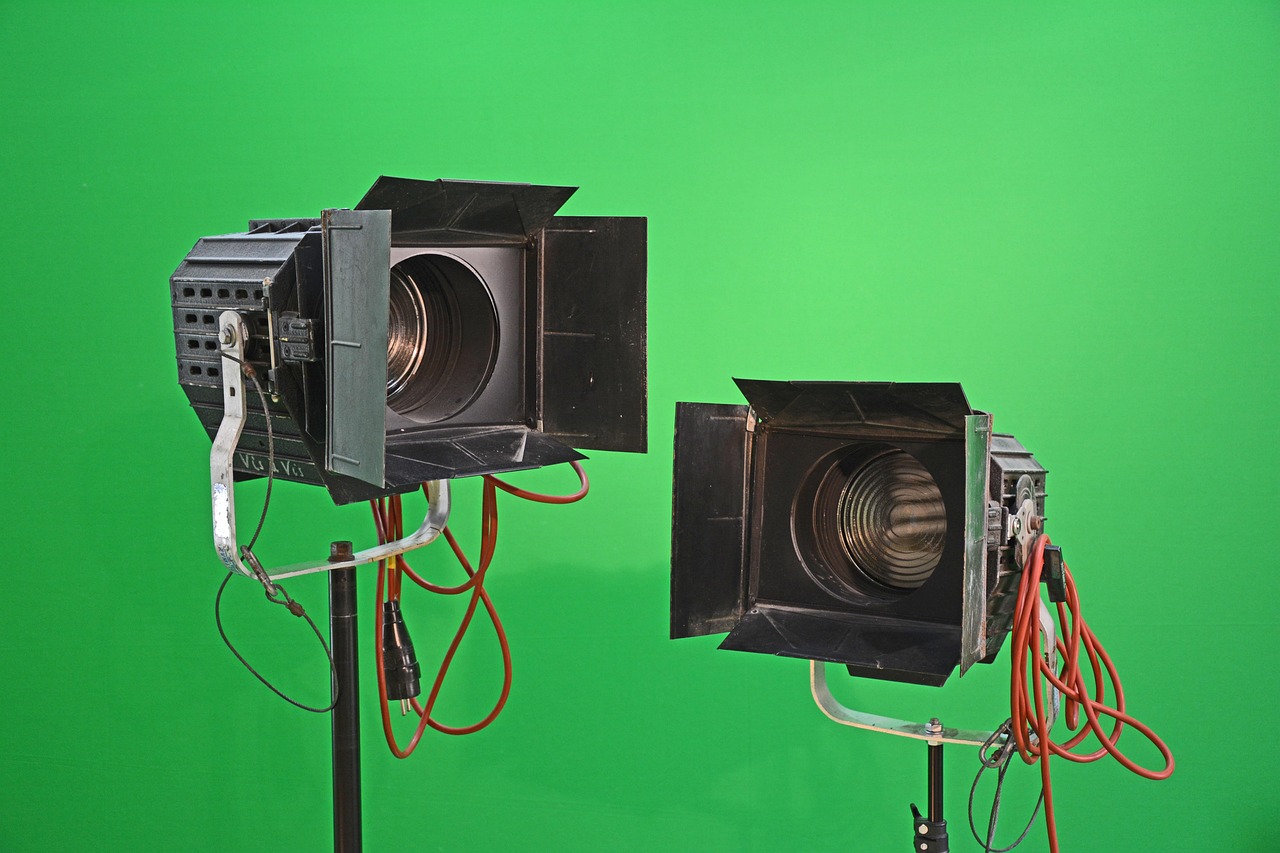
Barn doors – Adjustable metal flaps attached to the front of a fixture that shape the beam by cutting off light at the edges. Barn doors are essential for controlling spill and directing light precisely onto a performer or set piece. In a musical number, a designer might close the top and bottom doors to create a narrow vertical slice of light that isolates the lead singer. Over‑tightening the doors can produce hard shadows, while leaving them too open may result in unwanted illumination of background elements.
Ellipsoidal reflector spotlight (ERS) – Also known as a “profile” or “Leko,” this fixture uses an ellipsoidal reflector to focus a tight, controllable beam. ERSs are prized for their sharp edges and ability to accept gobos and shutters. They are the primary tool for “spot” lighting, where a designer highlights a specific area with precision. Example: a lead actor’s entrance may be accentuated with a narrow ERS beam, followed by a softening diffusion to blend with surrounding wash. Challenges include maintaining focus throughout a performance, as temperature changes can shift the focal point, and ensuring that the fixture’s angle does not cause “hot spots” on the audience.
Fresnel – A fixture named after its lens, which produces a soft, diffused beam with a gradual fall‑off. Fresnels are ideal for “wash” lighting, providing even coverage across large areas such as the stage floor or backdrop. A designer might use a series of Fresnels to create a warm sunrise effect, gradually increasing intensity and colour temperature. Because Fresnels have a “soft edge,” they are less prone to producing hard shadows, but they can generate “spill” if not properly masked, potentially washing out other lighting elements.
PAR can – Short for “parabolic aluminized reflector,” this fixture emits a strong, uniform beam with a relatively hard edge. PAR cans are commonly used for concert‑style lighting, creating dramatic colour fields or intense spot effects. In a rock‑musical, a designer may employ coloured PAR cans to wash the stage in alternating reds and blues, synchronised with music cues. The challenge with PAR cans lies in their limited beam control; additional accessories such as barn doors or gels are often required to shape the light without producing harsh spill.
LED (light‑emitting diode) – A solid‑state light source that offers high efficiency, low heat output, and extensive colour mixing capabilities. Modern theatre lighting heavily relies on LED fixtures for both spot and wash applications. LEDs can be programmed to change hue, saturation, and intensity rapidly, enabling dynamic effects such as sunrise simulations or strobe sequences. However, designers must be aware of the “color shift” phenomenon, where LEDs may render colours differently at varying intensities, necessitating careful calibration during rehearsals.
DMX (Digital Multiplex) – The standard communication protocol for controlling lighting fixtures, using a serial data stream transmitted over a 5‑pin XLR cable. DMX allows a console to address up to 512 channels, each representing a parameter such as intensity, colour, or movement. For example, a single channel may control the dimmer level of a Fresnel, while another channel may adjust the pan of a moving head. Common challenges include “address conflicts,” where two fixtures are set to the same DMX address, causing unintended simultaneous changes, and “cable length limitations,” which can result in signal degradation if not properly managed with repeaters or splitters.
Address – The unique DMX number assigned to a fixture (or a specific function within a fixture) that tells the console which channel to control. In a production with 120 fixtures, designers must carefully plan addressing to avoid overlap and to keep the patch sheet organized. An address typically consists of a start channel and the number of consecutive channels the fixture occupies. For instance, an LED moving head that uses 16 channels might be set to start at address 201, occupying 201–216. Misaddressing can cause a cascade of errors that are difficult to diagnose during a live show.
Channel – A single DMX data point that carries a value from 0 to 255, representing the level of a parameter. Channels are the building blocks of a lighting cue; each cue may adjust multiple channels simultaneously. A designer might write a cue that fades channel 45 (intensity of a front‑stage Fresnel) from 0 to 255 over eight seconds while simultaneously moving channel 78 (pan of a moving head) from 0 to 128. The challenge lies in managing the sheer number of channels in large productions, which can lead to “channel fatigue” where operators lose track of which parameter each channel controls.
Patch – The process of assigning physical fixtures to DMX addresses within the console’s software. Patching creates a map that links each fixture to its corresponding channels, allowing the designer to program cues accurately. A typical workflow involves “patching in” all fixtures, naming them (e.g., “Front Left Fresnel 1”), and verifying that each address corresponds correctly. Errors in patching can cause cues to affect the wrong fixtures, often discovered only after a rehearsal, necessitating re‑patching and re‑programming.
Plot – The visual representation of where each fixture is positioned on stage, usually displayed as a plan view on a computer screen. Plotting helps designers consider sightlines, angles, and coverage before physically hanging lights. In a theatre with a “fly‑tower,” the plot may indicate which battens hold each fixture, their focus points, and any accessories such as gels or gobos. Plotting challenges include accounting for “overlap” where multiple fixtures illuminate the same area, potentially causing colour muddiness, and ensuring that the plotted positions are feasible given the venue’s rigging constraints.
Focus – The act of adjusting a fixture’s aim, zoom, and sometimes lens to achieve the desired shape and edge of the light beam. Focusing is a critical rehearsal task that translates the designer’s intent into physical reality. For instance, a designer may require a tight “spot” on a soloist, demanding precise pan and tilt adjustments on an ERS, while a broader “wash” may need a wider zoom setting on a Fresnel. Common focus challenges include “focus drift,” where the beam moves due to temperature changes or mechanical slippage, and “uneven focus,” where the beam’s edge is not sharp enough for the intended effect.
Zoom – The ability of a fixture to change the size of its beam without moving the fixture physically. Zoom is controlled by a lens mechanism that expands or contracts the beam angle. A moving head with a 20‑to‑50 degree zoom can switch from a narrow spotlight to a broader wash in a single cue. Designers must be aware that zoom changes can also affect intensity; a wider beam spreads the same amount of light over a larger area, reducing apparent brightness. Calibration of zoom levels is essential to maintain consistent exposure across cues.
Shutter – A mechanical or electronic device that blocks part of a light beam, creating sharp edges or patterns. In an ERS, shutters are often used in conjunction with gobos to shape the projected image. For example, a designer may close the top and bottom shutters to produce a vertical slice of light, emphasizing a character’s silhouette. Shutter timing can be automated via DMX, allowing dynamic opening and closing during a cue. Challenges include ensuring the shutters close evenly to avoid “uneven edges,” which can distract the audience.
Crossfade – A technique where one lighting state fades out while another fades in simultaneously, creating a seamless transition. Crossfades are essential for maintaining narrative flow, especially in fast‑paced productions where abrupt changes would be jarring. A typical crossfade might involve decreasing the intensity of a warm wash while increasing a cool wash, blending the colours smoothly. The difficulty lies in programming the correct timing and ensuring that the overlapping fixtures do not produce unintended colour spikes or flicker.
Fade – The gradual increase or decrease of a single parameter, most commonly intensity. Fades are the building blocks of cues, allowing designers to sculpt the lighting over time. For instance, a fade‑in of 30 seconds can simulate sunrise, while a rapid fade‑out may signify a blackout after a dramatic moment. Designers must consider “fade curves” (linear, exponential, etc.) to match the emotional tone of the scene; a linear fade may feel mechanical, whereas an exponential fade can feel more natural.
Dimmer – An electronic device that regulates the voltage supplied to a lighting fixture, thereby controlling its intensity. Traditional theatre dimmers are “phase‑controlled” and may introduce a “flicker” if not properly synchronized with the console. Modern LED fixtures often use “digital dimming” that allows finer control without the artefacts associated with older analog dimmers. Challenges include “dim curve” mismatches, where the perceived brightness does not increase linearly with the dimmer level, requiring designers to adjust cue values to achieve the desired visual effect.
Control console – The hardware or software interface through which the lighting designer programs and executes cues. Consoles range from simple “desk” style boards with physical faders to sophisticated “PC‑based” systems with touchscreens and networked control. The console records cue data, manages DMX output, and often provides playback features such as “snapshots” and “memories.” A major challenge for students is mastering the console’s workflow, as different manufacturers (e.g., ETC, MA Lighting, High End) have distinct user interfaces and terminology.
Memory – A stored set of parameters (intensity, colour, position, etc.) that can be recalled instantly during a performance. Memories allow designers to trigger complex lighting states with a single button press. For example, a “memory 101” might hold the lighting state for Act 1, Scene 2, while “memory 102” contains the state for Act 2, Scene 1. The challenge is ensuring that memories are correctly programmed and that there are no “memory conflicts” where two cues attempt to use the same memory slot, causing unexpected results.
Snapshot – A temporary capture of the current lighting state, often used as a reference point for creating new cues. Snapshots are useful during rehearsals when a designer wants to preserve a particular look while experimenting with variations. By taking a snapshot, the designer can revert to the original state if the experiment proves unsatisfactory. A common pitfall is neglecting to label snapshots clearly, leading to confusion when multiple versions of a cue are stored.
Look – The overall visual quality of a lighting design, encompassing colour palette, intensity, texture, and mood. A “look” is the designer’s artistic interpretation of the script, often communicated to the director and production team through visual references such as mood boards or renderings. For instance, a “cold, industrial look” might employ predominantly blue and steel‑grey colours with hard shadows, while a “dreamy, pastel look” could use soft washes of pink and lavender. Translating an abstract look into concrete technical settings is one of the most challenging aspects of lighting design, requiring both creative vision and technical precision.
Layering – The practice of stacking multiple lighting elements to build depth and complexity. Layers can include a base wash, a mid‑range colour wash, and a top‑level spot, each contributing to the final visual texture. In a musical number, designers may layer a blue wash (background), a amber rim (mid‑range), and a white spotlight (foreground) to create a three‑dimensional effect. Over‑layering can lead to “colour muddiness,” where too many overlapping hues cause the audience to lose visual clarity, so designers must balance the number of layers with the intended emotional impact.
Texture – The visual surface quality created by lighting, often achieved through gobos, patterned gels, or directional control. Textural lighting can suggest materials such as brick, foliage, or water. For example, a leaf‑pattern gobo combined with a cool wash can evoke a forest canopy, while a rippled glass texture can suggest a watery surface. Challenges include ensuring that texture does not dominate the scene, as excessive patterning can distract from performers or interfere with readability of set details.
Angle – The direction from which light strikes a surface, measured in degrees relative to the stage plane. Angles affect the quality of shadows, highlight shapes, and contribute to the perception of depth. A low angle (e.g., 30°) creates long, dramatic shadows, often used in horror or noir scenes; a high angle (e.g., 75°) produces short shadows, suitable for bright, even illumination. Designers must consider “angle of incidence” when positioning fixtures to avoid “flattening” the actors’ faces or creating unwanted “shadow spikes.”
Footprint – The area on stage that a light beam covers. Understanding the footprint is essential for planning coverage and avoiding gaps. A wide‑angle Fresnel may have a footprint of several meters, while an ERS with a narrow zoom may produce a footprint as small as a single performer’s standing area. Calculating footprints helps designers allocate fixtures efficiently, ensuring that every part of the stage receives appropriate illumination without redundancy.
Beam – The shape and quality of the light emitted from a fixture, often described in terms of softness, edge definition, and divergence. Beams can be “hard” (sharp edges) or “soft” (gradual fall‑off). A hard beam from a PAR can create a stark, graphic effect, while a soft beam from a Fresnel provides a gentle wash. Beam characteristics are influenced by lens type, zoom setting, and accessories such as diffusers. Designers must match beam type to the narrative intent; a mismatch can undermine the desired atmosphere.
Diffusion – The process of scattering light to soften its edges and reduce harsh shadows. Diffusion can be achieved using gels, frosted lenses, or external diffusion filters. In a romantic scene, a designer might add diffusion to a spotlight to create a glow that envelops the couple, enhancing the emotional tone. Over‑diffusion, however, can lead to loss of definition, making it difficult for the audience to discern details on set or costume. Balancing diffusion with beam control is a nuanced skill.
Sharpness – The degree to which a beam’s edge is defined, often expressed as a percentage or angle. Sharpness is critical for “spot” work, where precise isolation of a performer is required. An ERS with a 5° edge is considered very sharp, suitable for drawing a line of light across a stage. Designers must be aware that sharpness can be altered by changing the focus distance; moving a fixture closer to the stage reduces the effective edge angle, making the beam appear softer.
Fill – Supplemental lighting used to reduce shadows created by primary “key” lights. Fill lights are typically placed at lower intensity and opposite the key to soften contrast. In a dramatic monologue, a key light might illuminate the actor from stage left, while a fill from stage right lifts shadows on the opposite side, preserving facial detail. Too much fill can flatten the image, eliminating the three‑dimensional quality that key lighting provides, so designers must calibrate fill levels carefully.
Key – The dominant light source that shapes the primary visual focus of a scene. The key light establishes the direction of light and creates the most pronounced shadows. In a spotlighted soliloquy, the key light may be a narrow ERS aimed directly at the actor, defining the character’s emotional state. Misplacing the key can result in unwanted shadows or a lack of visual emphasis, undermining the narrative impact.
Backlight – Light that originates from behind the subject, separating it from the background and creating a rim of illumination. Backlight adds depth and can highlight silhouettes. In a dance piece, a strong backlight may outline the dancers’ movements, emphasizing fluidity. However, excessive backlight can cause “spill” onto the audience or create glare for the performers, so designers must manage its intensity and angle precisely.
Side light – Light positioned laterally to the subject, enhancing texture and revealing form. Side lighting is effective for emphasizing musculature, costume detail, or set texture. In a period drama, side lights may accentuate the intricate embroidery of a gown. The main challenge is avoiding “hard shadows” that can obscure facial features; blending side light with fill and key lighting helps maintain visual balance.
Practical – A light source that appears on stage as part of the set, such as a table lamp, chandelier, or streetlight. Practicals contribute to realism and can be used as narrative cues (e.g., a lamp turning on to signal a character’s arrival). Designers often rig practicals with dimmers or DMX control to integrate them into the lighting plot. Challenges include achieving the correct colour temperature for the practical (often warm) while ensuring that it does not overpower surrounding fixtures.
Special – A fixture used for a specific effect rather than general illumination. Specials may include moving heads for dynamic colour changes, laser units for atmospheric fog, or strobe lights for rapid flashing. In a thriller, a strobe may simulate a lightning strike, while a moving head could create a sweeping colour surge. Managing specials requires precise timing and coordination with sound and video cues, and improper use can cause audience discomfort or safety concerns.
Rigging – The system of hardware (batten, trusses, clamps, safety cables) that supports lighting fixtures. Rigging determines where fixtures can be hung and influences angles, reach, and load capacity. A designer must collaborate with the rigging crew to ensure that fixtures are positioned at the correct height and that the weight does not exceed the rig’s rating. Common rigging challenges include “over‑loading” a battens, which can lead to structural failure, and “accessibility,” where fixtures placed high become difficult to adjust during a run.
Stand‑by – A light that remains powered on but at a low intensity, ready to be activated quickly. Stand‑by fixtures are useful for rapid scene changes where a full fade‑in would be too slow. For instance, a stand‑by LED wash may be kept at 10% intensity, ready to jump to full brightness at a cue. The main issue with stand‑by lights is managing power consumption, as keeping many fixtures on can increase electricity usage and generate additional heat.
Colour mixing – The process of combining primary colours (typically red, green, blue) to produce a wide spectrum of hues. Modern LED fixtures often use RGB or RGBA (adding amber) mixing, allowing designers to create custom colours without physical gels. Colour mixing enables smooth transitions, such as a gradual shift from blue to orange to depict sunset. However, colour mixing can introduce “metamerism,” where colours appear different under varying viewing conditions, requiring designers to test mixes on the actual stage surface.
Metamerism – A phenomenon where two colours match under one light source but appear different under another. In theatre, this can occur when a designer uses LED colours that look correct under the on‑stage LEDs but appear mismatched under the audience’s ambient lighting. To mitigate metamerism, designers often perform “colour checks” using the same light sources that will be present during the performance, ensuring consistency.
DMX addressing – The assignment of start channel numbers to each fixture’s control parameters. Proper DMX addressing ensures that each control on the console corresponds to the intended function on the fixture. For example, an LED moving head might occupy channels 1‑16; assigning it to start at channel 1 means that channels 1‑16 will control its functions. Incorrect addressing can cause a cue to affect the wrong fixture, leading to unpredictable results. Designers must keep a detailed “address sheet” and verify it during the patching stage.
Universe – A collection of 512 DMX channels that can be transmitted simultaneously. Large productions may use multiple universes to accommodate many fixtures. A typical theatre may operate with two universes: one for front‑of‑house lighting and another for stage‑side fixtures. Managing multiple universes adds complexity, as the console must route cues correctly across each universe, and timing mismatches can occur if the DMX signal is not synchronized.
Fixture – Any device that produces light, including conventional instruments (Fresnel, ERS, PAR) and modern LED units. Each fixture has specific characteristics such as beam angle, colour rendering, and power requirements. Understanding the capabilities of each fixture allows designers to allocate them appropriately within the plot. For instance, a high‑CRI LED wash may be reserved for scenes demanding accurate costume colours, while a low‑CRI PAR can be used for atmospheric effects where colour fidelity is less critical.
Channel strip – The section of a lighting console that controls a single channel’s parameters, such as intensity, colour, and effect. Each strip may have faders, buttons, and knobs for real‑time adjustments. During a live show, the lighting operator may use channel strips to fine‑tune levels on the fly, responding to director cues. The challenge is that a complex show can require dozens of active channel strips, demanding a high level of concentration and familiarity with the console layout.
Fade time – The duration over which a parameter changes from one value to another. Fade times are specified in seconds or beats, depending on the console’s settings. A designer might set a fade time of 4 seconds for a gradual lighting transition, or a 0.5‑second fade for a rapid cut. Choosing appropriate fade times is crucial for pacing; a fade that is too slow can disrupt the rhythm of a musical number, while a fade that is too fast may appear abrupt.
Cue list – A sequential arrangement of cues that defines the order and timing of lighting changes throughout a performance. The cue list is the blueprint that the lighting operator follows during a show. Each cue includes information such as the cue number, description, fade time, and any special actions (e.g., “Blackout”). Maintaining an accurate cue list is essential; errors can lead to missed cues, causing visible gaps in lighting that break audience immersion.
Blackout – An instantaneous transition to complete darkness, often used to signal the end of a scene or to create dramatic impact. Blackouts are typically executed by setting all dimmers to zero or by triggering a “blackout” button on the console. While effective, blackouts must be coordinated with sound and safety protocols; sudden loss of light can affect performers’ orientation, so designers may provide a brief “fade‑to‑black” rather than an abrupt cut in certain contexts.
Fade‑to‑black – A gradual reduction of all lights to darkness over a specified time, creating a smoother transition than an immediate blackout. Fade‑to‑black is useful when the narrative requires a lingering visual mood before the lights fully extinguish. Designers must decide the appropriate duration; a long fade‑to‑black may diminish the impact of a sudden surprise, while a short fade may not allow the audience to absorb the visual ending.
Palette – The range of colours selected for a production, often defined early in the design process. A palette may be limited to a few dominant hues to maintain visual coherence, or it may be expansive to reflect varied emotional states. For example, a production set in a dystopian world might use a restricted palette of greys, muted blues, and occasional splashes of red to highlight moments of violence. Consistency in palette helps the audience subconsciously track thematic shifts.
Contrast – The difference in luminance or colour between two lighting elements. High contrast can create dramatic tension, while low contrast yields a softer, more harmonious look. In a horror piece, designers may employ high contrast between deep shadows and bright highlights to amplify fear. Managing contrast involves balancing intensity, colour temperature, and edge sharpness across fixtures, ensuring that the desired visual tension does not become overwhelming or unintentionally hide important details.
Shadow – The area where direct light is blocked, creating a darker region. Shadows convey depth and can be shaped intentionally to enhance storytelling. A long, directional shadow cast by a key light may suggest an ominous presence. Designers must be mindful of “shadow direction” to maintain continuity; inconsistent shadow angles can confuse the audience about the spatial relationship of objects on stage.
Gobo rotation – The ability of a fixture to spin a gobo, creating moving patterns. Rotating gobos are frequently used to simulate natural phenomena such as rain, snowfall, or flickering fire. The speed and direction of rotation are controlled via DMX, allowing precise synchronization with music or sound effects. Over‑rotation can cause a loss of focus, making the pattern appear blurry, so designers must test rotation speeds during rehearsals.
Movement (pan/tilt) – The horizontal (pan) and vertical (tilt) motion of a moving‑head fixture. Pan and tilt enable dynamic lighting that follows performers or creates sweeping visual effects. For example, a moving head may pan from left to right to follow a dancer’s trajectory, while simultaneously tilting upward to illuminate a set piece. Accurate programming of pan/tilt paths is essential; miscalculations can result in “overshoot,” where the fixture moves beyond the intended target, exposing unintended areas.
Speed (movement speed) – The rate at which a moving‑head fixture changes its pan or tilt position. Speed is measured in seconds per full rotation or as a percentage of maximum velocity. Fast movement can create energetic, kinetic lighting, suitable for action sequences, while slow movement adds subtlety to a romantic scene. Designers must consider the audience’s perception; too rapid a movement may appear jittery, whereas too slow a movement may feel unresponsive.
Strobe – A lighting effect that flashes at a rapid rate, creating a sense of disorientation or heightened tension. Strobes are commonly used in club scenes, combat sequences, or to simulate lightning. The strobe rate is programmable via DMX, and designers can synchronize it with sound cues for maximum impact. Safety considerations are paramount, as excessive strobing can trigger photosensitive epilepsy in susceptible audience members; most venues require a limited duration and intensity for strobe usage.
Fade‑in – The gradual increase of light from darkness to a specified level. Fade‑ins are often used to introduce a new scene or to build suspense. A designer might program a 6‑second fade‑in of a blue wash to suggest a night setting, allowing the audience to acclimate to the visual environment. Timing the fade‑in with musical or narrative cues ensures that the lighting supports, rather than competes with, the storytelling.
Fade‑out – The opposite of a fade‑in; it reduces light intensity to darkness. Fade‑outs are useful for concluding scenes or for creating a moment of reflection. A gradual fade‑out may accompany a character’s monologue, letting the audience focus on the spoken word as the visual field recedes. Designers must coordinate fade‑outs with sound cues to avoid abrupt silences that could feel jarring.
Snapshot cue – A cue that captures the current state of all channels, allowing designers to return to that exact configuration later. Snapshots are valuable during rehearsals when experimenting with lighting variations; the designer can quickly revert to a known baseline. The main challenge is organization; without clear labeling (e.g., “Snapshot A – Act 1 Scene 2”), it becomes difficult to retrieve the correct state amidst numerous snapshots.
Palette cue – A cue that changes the overall colour palette of the lighting, often by adjusting multiple fixtures’ colour channels simultaneously. Palette cues can shift the mood from warm to cool, reflecting a narrative transition. For instance, a palette cue may move from amber to blue to signal a change from day to night. Designers must ensure that the transition does not produce colour “spikes” where intermediate hues become overly saturated.
Intensity cue – A cue focused primarily on adjusting the brightness levels of fixtures without altering colour or position. Intensity cues are useful for dynamic scenes where the mood fluctuates quickly, such as a fight sequence where lights dim and brighten in response to action. While simple in concept, intensity cues require precise scaling to avoid abrupt jumps that could distract the audience.
Focus cue – A cue that modifies the aim, zoom, or lens settings of fixtures to alter the shape of the light. Focus cues are essential when moving from a wide wash to a tight spot, such as transitioning from a crowd scene to an intimate duet. Designers must verify that focus adjustments are smooth; sudden changes can cause the beam to “jump,” breaking visual continuity.
Color cue – A cue that changes the hue or saturation of fixtures, typically using DMX colour channels. Color cues are central to creating emotional shifts; a sudden switch from cool blue to warm orange can signify a character’s emotional breakthrough. Designers must be aware of colour blending; overlapping colour cues can produce unintended mixtures, so careful layering is required.
Movement cue – A cue that commands pan, tilt, or other motion parameters. Movement cues can be choreographed to follow performers, create sweeping motions, or generate kinetic effects. In a ballet, a movement cue may have a moving head follow the principal dancer across the stage, maintaining consistent illumination. The challenge is synchronization; any lag between the performer’s movement and the lighting motion can break immersion.
Effect cue – A cue that triggers special effects such as fog, lasers, or video projections. Effect cues are often linked to sound or automation, requiring precise timing. For example, a thunder effect cue may activate a strobe and a low‑frequency rumble simultaneously. Designers must coordinate with technical crews to ensure that effect cues do not interfere with primary lighting, and that safety protocols (e.g., fog density limits) are adhered to.
Fade curve – The mathematical shape of a fade, dictating how the intensity changes over time. Common curves include linear (steady change), exponential (slow start, rapid finish), and logarithmic (rapid start, slow finish). Selecting the appropriate fade curve influences the perceived naturalness of a transition; an exponential fade may feel more organic when simulating sunrise, while a linear fade provides a uniform change for mechanical effects.
DMX splitter – A device that duplicates a DMX signal to multiple outputs, allowing several consoles or devices to receive the same data. Splitters are useful in large venues where multiple control stations are needed. However, each split must maintain signal integrity; using low‑quality splitters can introduce latency or data loss, causing fixtures to behave erratically. Designers should test the entire DMX chain before the performance.
DMX terminator – A resistor (typically 120 Ω) placed at the end of a DMX line to prevent signal reflections. Proper termination ensures that the DMX signal remains stable across long cable runs. Failure to terminate a DMX line can result in “ghosting,” where unintended values appear on channels, leading to flickering or unintended movements. Terminators are a simple yet critical component of a reliable DMX network.
Power distribution – The system that delivers electrical power to lighting fixtures, typically via distribution boxes and circuit breakers. Effective power distribution balances load across circuits, preventing overloads that could trip breakers mid‑show. Designers must calculate the total wattage of all fixtures, considering both nominal and peak power draws, and allocate them to appropriate circuits. Overloading a circuit can cause a sudden loss of multiple fixtures, disrupting the production.
Safety cable – A secondary cable that secures a lighting fixture to a structural element, providing redundancy in case the primary mounting fails. Safety cables are mandatory in many UK venues and are inspected regularly. While they add a layer of protection, improper routing can cause “cable drag,” where the fixture moves unintentionally, affecting aim and focus. Designers must coordinate with riggers to ensure safety cables are tensioned correctly and do not interfere with other equipment.
Load chart – A document that lists the weight and power requirements of each fixture, used for planning rigging and power distribution. Load charts help designers and riggers determine whether a battens can support a specific fixture and whether the electrical infrastructure can handle the load. Ignoring load chart data can lead to structural failure or electrical hazards. Maintaining accurate, up‑to‑date load charts is essential for safe operation.
Colour wheel – A visual representation of the colour relationships used in lighting design, often displayed as a circle showing primary, secondary, and tertiary hues. The colour wheel assists designers in selecting harmonious colour combinations, such as complementary (opposite) or analogous (adjacent) colours. For example, a designer may choose a blue‑green wash complemented by a warm orange accent to create visual tension. Understanding colour theory is vital for creating effective emotional palettes.
Colour temperature shift – The change in perceived colour temperature when a fixture’s intensity is altered. Many LED fixtures become cooler (bluer) at lower intensities, a phenomenon known as “colour shift.” Designers must account for this when programming fades; otherwise, a dimming cue may unintentionally alter the mood. Calibration tools and pre‑programmed “intensity‑compensated” curves can
Key takeaways
- The following glossary presents the essential terms and concepts that form the foundation of a Certificate Programme in Theatre Lighting Techniques in the United Kingdom.
- Designers must balance intensity with safety regulations; excessive output can cause glare or heat issues, whereas insufficient output may leave performers under‑exposed.
- Understanding luminance helps designers choose appropriate colours and textures for set pieces, ensuring that visual contrast is maintained throughout the performance.
- In a period piece set in the 19th century, a designer might select warm‑tinted LED fixtures to evoke the glow of gas lamps, whereas a futuristic sci‑fi production could employ cool light to suggest artificial illumination.
- Colour rendering index (CRI) – A scale from 0 to 100 that evaluates how accurately a light source reproduces colours compared with a reference source.
- Common challenges include alignment errors, where the projected pattern does not match the intended area, and focus adjustments, which require precise lens settings to keep the image sharp.
- Designers must handle gels carefully; they can melt or crack under high heat, and they may fade over time, affecting colour consistency between rehearsals and performances.